
CaptainsBet Login – Access Your Account in Ghana

This page is your quick guide to getting into your Captainsbet login and, if you are new, setting up an account from scratch. No fluff, just the steps that matter: logging in, resetting a forgotten password, registering, and sorting out the usual hiccups Ghanaian punters run into
Contents
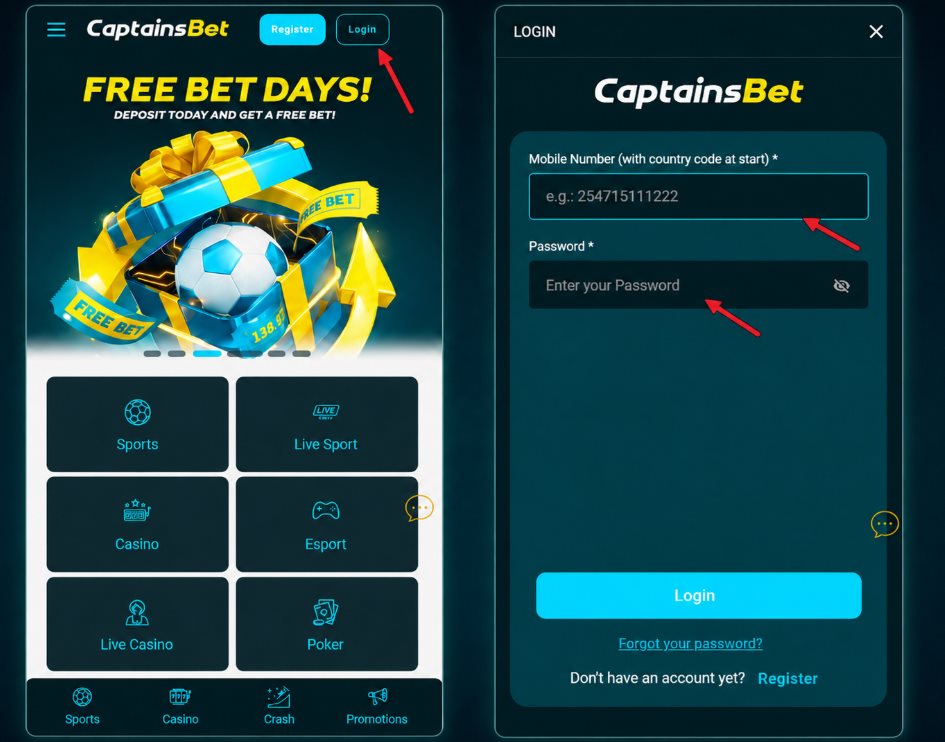
How to make your Captain Bet Login?
Logging in takes seconds once your account is set up. Here is the whole thing:
- Open the CaptainsBet website or app and find the Login button, top right corner.
- Enter your registered phone number (or username) and your password.
- Tap Login.
- You land straight on your account dashboard, ready to place a bet slip.
If your details are correct, that is it. Nothing else to do. Keep your login on a phone you trust, and you skip re-entering it every time.
Forgot Your Password?
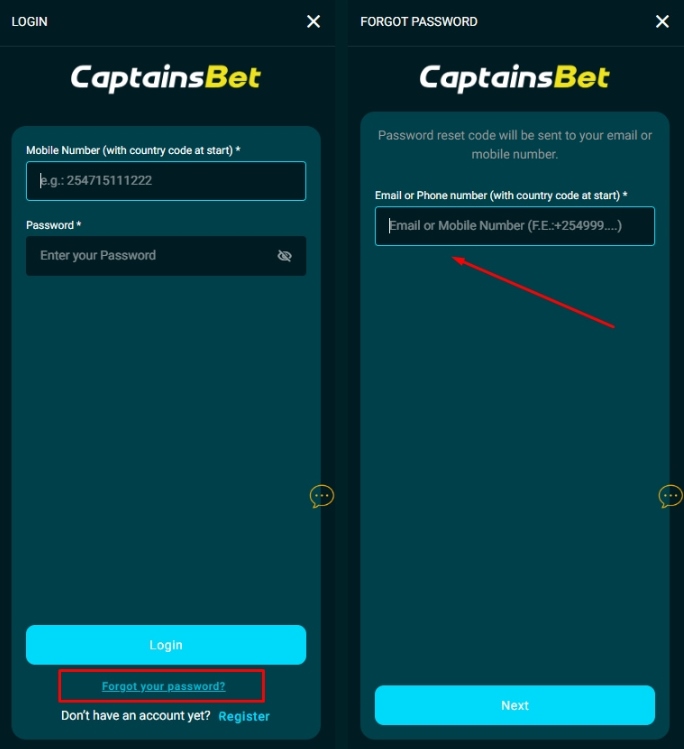
Happens to everyone. Resetting the captain bet login password is fast:
- On the login screen, tap “Forgot Password”.
- Enter the phone number or email tied to your account.
- You get a reset code by SMS or email, usually within a minute.
- Enter the code, then set a new password.
Pick something you have not used elsewhere. If the SMS is slow, give it a couple of minutes before asking for another one, since requesting several codes at once can jam things up.
How to Register a New CaptainsBet Account
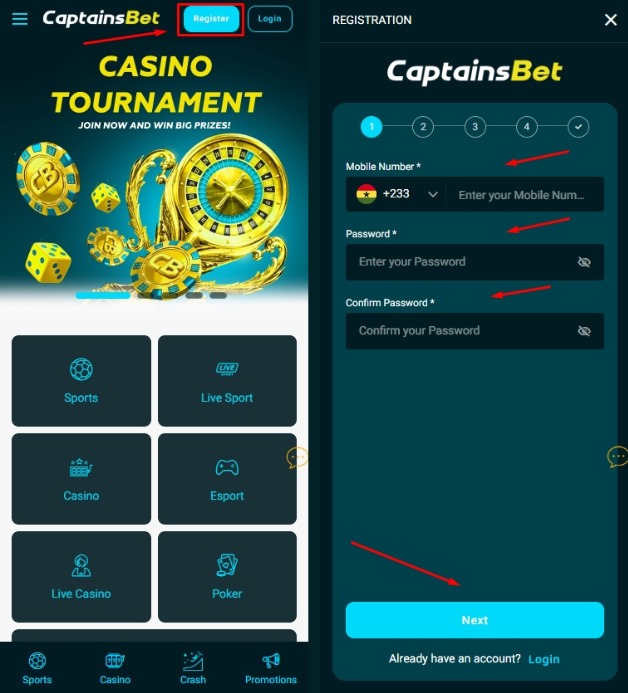
No account yet? Setting one up runs about two minutes.
- Tap the Register or Sign Up button on the homepage.
- Choose your registration method: phone number is the most common in Ghana.
- Enter your details, including your +233 phone number and a strong password.
- Confirm the verification code sent to your phone.
- Log in, and your account is live.
Use your own real number, since that is what ties to your Mobile Money later for deposits and withdrawals.
Registration Requirements
Before you sign up, make sure you tick these boxes:
- You must be 18 or older. Betting is strictly for adults.
- A valid ID for verification, usually your Ghana Card or a passport.
- A working phone number registered in your name.
- Your account currency will be set in Ghana Cedi (GHS).
Getting your details right at sign-up saves headaches later, especially when you want to cash out and the name on your Ghana Card has to match your account.
Common Login Issues & Quick Fixes
Most login problems are small and quick to fix. The usual suspects:
- Wrong password: Double-check caps lock and any autofill. Still stuck? Use “Forgot Password” to reset it.
- Account locked: Too many failed login attempts can lock you out for a short while. Wait a few minutes, then try again with the correct details, or reset your password.
- SMS code not arriving: Network delays on MTN, Telecel, or AirtelTigo can hold up the code. Check your signal, wait a minute or two, then request a new one. Restarting your phone often helps.
If none of that works, CaptainsBet support is reachable through live chat to unlock things on their end.
FAQ
Is registration on CaptainsBet free?
Yes. Creating an account costs nothing. You only spend money once you deposit and place a bet.
What if I forget my username?
Use the phone number linked to your account to log in instead, or reach support through live chat to recover your username.
Can I have more than one CaptainsBet account?
No. One account per person. Multiple accounts can get flagged and frozen, so stick to a single profile.
Do I need to verify my account right after registering?
You can start betting quickly, but full verification with your Ghana Card or passport is required before you withdraw. Doing it early means no delays when you win.
I deposited but cannot log in. What do I do?
First reset your password to rule out a login error. If your money is showing on the wrong or a duplicate account, contact support with your transaction details and they will sort it.
